Wednesday, August 25, 2010   |   Login  
On-line manual:
   Excel SMS Client


SMS Gateway for software developers
Home
SMS Server 6
On-line manual
Introduction
Disclaimer
About
Package contents
Server
Server Monitor
Server Manager
Excel SMS Client
Outlook SMS Client
Ozeki SMS Client
SMS technology
MMS technology
Product features
Installation guide
User guide
Developers guide
Case studies
Appendix
Search
Download
Support
How to buy
Resellers
MMS Server 6
SMS Wall
IP SMS Gateway
Ozeki Toolbar
Excel SMS
Company


For SMS service providers we recommend the following product:
Ozeki NG SMS Gateway


On-line manual:
  Explore all the features in this on-line HTML documentation.
Product guide:
  This downloadable pdf explains all the features of Ozeki Message Server 6.


Newsletter:
  Sign up to get news about product updates!

E-mail:
  You can send tech. questions in e-mail to the following address: info @ ozeki.hu

OZEKI MESSAGE SERVER - Product Guide

Server Manager Contents | SearchOutlook SMS Client

Home > Introduction > Package contents > Excel SMS Client

OZEKI Excel SMS Client

The Excel SMS client enables you to send SMS messages from Microsoft Excel. To achieve this goal, all you have to do is open two excel spread sheets: Messages.xls and Ozeki.xls. In the Messages.xls spread sheet, you need to fill the telephone numbers into the first column and the messages into the second column. In the Ozeki.xls excel sheet you will find a macro that can be started by clicking on the Send all button. This macro will connect to Ozeki Message Server 6 over the office LAN or over the internet and will send the SMS messages you have edited on the Messages.xls sheet. The parameters for this network connection can be edited on the Ozeki.xls spread sheet (Figure 1.).
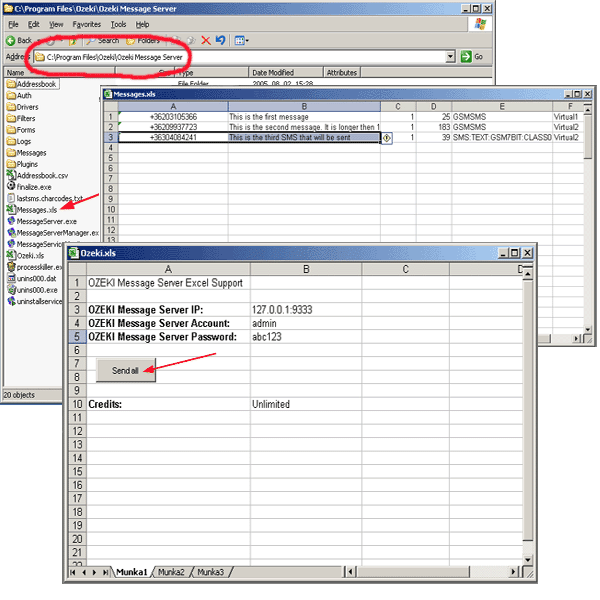

Figure 1 - Creating the excel sheet


Next page: Outlook SMS Client
For more information please contact us! Tel: (36) 1 371 0150, Fax: (36) 1 371 0151, E-mail: info @ ozeki.hu Tipp: check out our MMS Gateway!  


Home

Copyright © 2000-2010 - Ozeki Informatics Ltd. - All rights reserverd.