
IP SMS technology
If you plan to send or receive larger number of SMS messages, it is worth to consider using the Internet (Figure 1). Over the Internet (or over a private IP network, such as a leased line), it is possible to connect directly to the GSM operator's SMS Center (SMSC). The SMSC is responsible for receiving, storing and delivering the SMS messages in a GSM telephone network. There are great benefits of direct connection to this service.
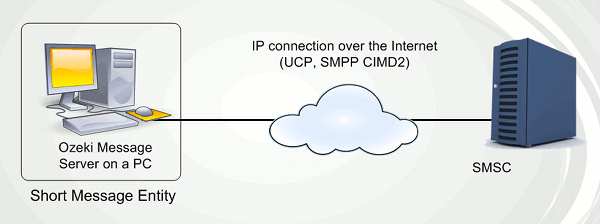
A large number of messages can be sent or received in a short time. The sender's phone number can be freely modified. The availability of the service can be monitored.
If you work with great volumes of messages, this solution is cheaper, faster and more reliable than the alternative solution of using a GSM handy connected to a computer.
Ozeki Message Server enables you to connect directly to your service provider's SMSC through the Internet or a leased line using TCP/IP. In order to use this option, first you need to sign a contract with your GSM service provider, to get direct access to its SMSC. If you have a contract you will receive their IP address, a port number and user name and password to access their service. Often they will ask to set up a VPN connection to their service. After a connection is available to the SMSC, an SMS protocol is required to be able to send and receive SMS messages. The most common protocols are UCP, SMPP and CIMD2. (Of course all of these are supported by Ozeki Message Server. In fact you can use more than one of these protocols simultaneously.) You can read more about these protocols on the following pages.
| Universal Computer Protocol (UCP) |
| Short Message Peer to Peer Protocol (SMPP) |
| Computer Interface Message Distribution version 2 (CIMD2) |
It is also important to mention, that some service providers use custom protocols, for example XML over HTTP. If you wish to use Ozeki Message Server with your service provider, and your protocol is not yet included in our program, please contact us. There is a good chance we will add support to your service free of charge.