
SMS messaging with a mobile phone attached to the PC
If you plan to send/receive less than 15 000 SMS messages per day, a good option is to attach a GSM phone or GSM modem to your PC. The GSM phone must be equipped with a SIM card that has good tariff for SMS messages.
The GSM phone can be attached with a data cable, with an InfraRed port (IR) or with a BlueTooth (BT) connection. With this setup you can use a computer program such as Ozeki Message Server to send/receive SMS messages. The computer program in this case uses the attached device to communicate with the GSM network.
If a message is sent by the application running on the computer it is first sent to the attached GSM phone, and as a second step the GSM phone transmits the messages to the SMSC of the GSM service provider through a wireless link (Figure 1.). When a message is received, the GSM phone stores the message in its memory or on the SIM card and sends a notification to the PC. When the program running on the PC receives this notification, it reads the appropriate memory cell and deletes the message from the phone to make room for the next incoming message (Figure 1.).
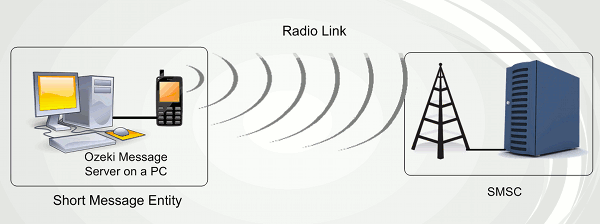
Sending an SMS message using a cell phone takes about 5-6 seconds. Receiving takes about the same time. A good software, such as Ozeki Message Server allows you to attach more than one device to your PC and to use them simultaneously to increase capacity.
The best option to connect a phone to the PC is to use a standard RS232 serial cable. USB cables, InfraRed and BlueTooth connections are not that reliable. You can read more about the connection methods on the following pages: